Starter sites
Start a new site from a library of complete starter sites: pages, header, footer, Design System, fonts and images, imported in one click.
On this page
A starter site is a complete website you can import in one go: its pages, a header and a footer, the Design System with its colors, fonts and text styles, and every image. You start from a finished design and replace the sample business with your own.
The starter sites live in a library on Uncoder's content server (cloud.uncoderbuilder.com), under Uncoder → Library → Starter sites. It has starter sites for businesses such as clinics, cafés, law firms, gyms, studios and software products, newest first. Many are free; the others, mostly larger sites with more pages, come with a Pro or Agency licence, together with new starters each month.
Only administrators see the Starter sites tab. You also reach it from the Starter sites card on Uncoder → Dashboard.
Browse the library
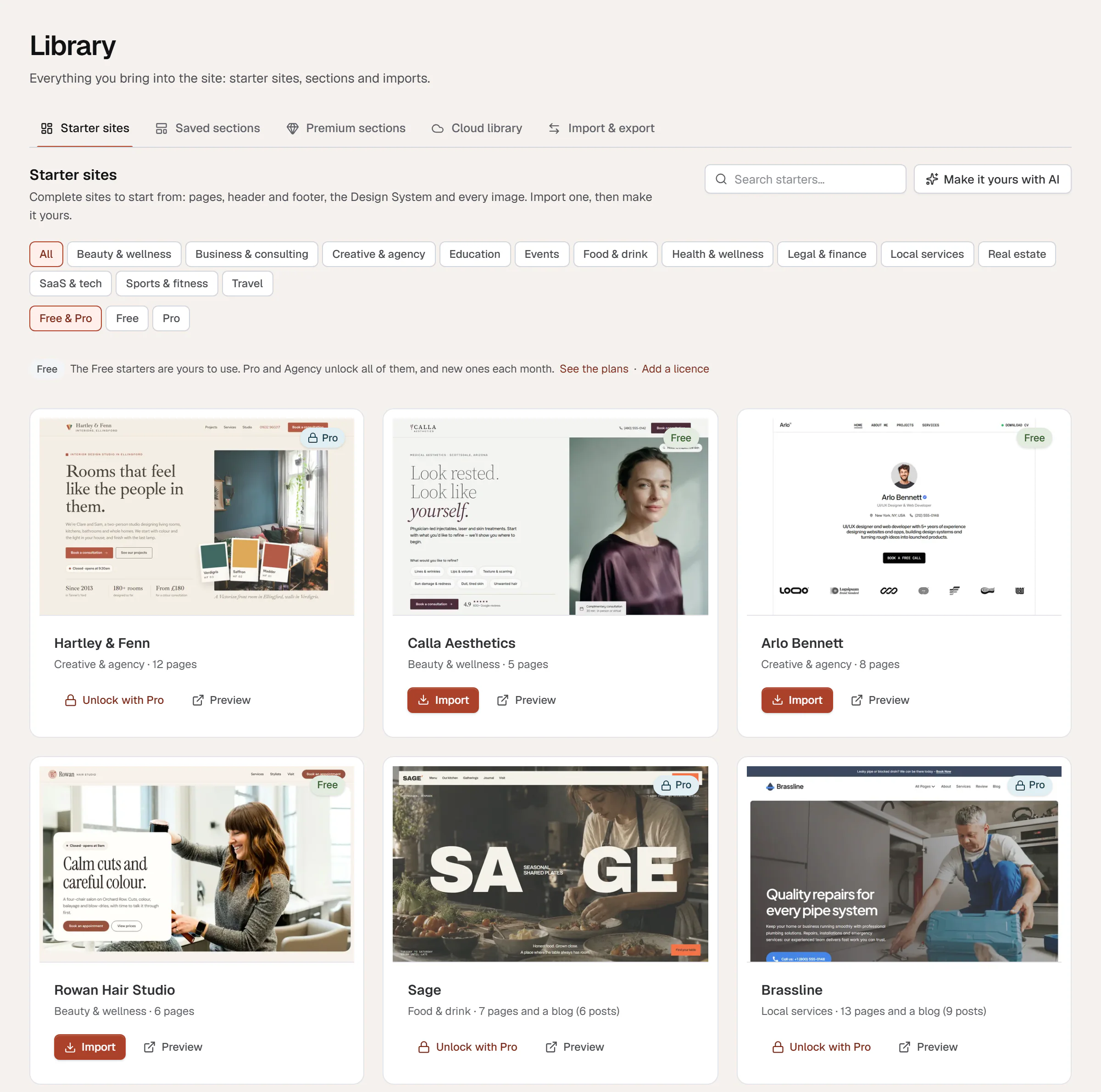
- Search starters… at the top finds starters by name, category, description and keywords.
- The first row of buttons filters by category, such as Local services, Health & wellness, Creative & agency or SaaS & tech. All shows every category.
- Free & Pro, Free and Pro filter by plan.
Each card shows a picture of the starter's home page, a Free or Pro badge, its category and a one-line summary. A line above the cards tells you what your plan covers, for example The Free starters are yours to use. Pro and Agency unlock all of them, and new ones each month.
Preview a starter
Click the picture or Preview. The starter's live demo opens in a new tab, so you can click through its pages before you import anything.
Import a starter
Click Import
Click Import on the card. Uncoder downloads the starter, and the dialog Import with the starter's name opens. Nothing on your site has changed yet.
Choose what comes in
The dialog lists the parts of the starter with their counts: Design System, Theme Builder, Pages & posts, Menus, Images & files, Custom fonts and, for some starters, Blog posts. All are ticked; untick what you do not want. The Design System part replaces yours, as its badge says, and a restore point is kept.
Decide about items that already exist
If pages, templates or menus with the same names exist on your site, choose Keep mine, Replace mine or Keep both.
Check the two options
Activate headers, footers and other templates and Use the kit’s home page are both on. Untick them to keep the starter's templates as drafts and your current home page.
Import
Click Import and keep the page open while the images upload. When it is done, the dialog says the starter is in and lists everything it created, each with an Edit link.
These are the same choices as for any site kit. See Site kits for the details.
What happens to your site
- Pages come in as they are in the starter, which means published. Import a starter into a new site, a staging copy, or turn on coming soon mode while you make it yours.
- The header and footer show on the whole site when Activate headers, footers and other templates is on. Otherwise they arrive as drafts in the Theme Builder.
- The starter's home page becomes your home page when Use the kit’s home page is on.
- A restore point is saved first. If the result is not what you wanted, click Undo this import in the result, or Restore under Library → Import & export → Restore points, and your site goes back to how it was before. See Undo an import.
- Your Design System is replaced by the starter's colors, fonts, text styles and buttons. You can also go back from the Design System history.
- Images and fonts are copied into your media library and your custom fonts, so the site does not depend on Uncoder's servers.
- The texts describe the starter's sample business. Replace them by hand, or let your AI app do it with Make it yours.
- Imported starters stay. They keep working if you remove the licence or it ends.
Importing on a site that is already live publishes the starter's pages and can replace your header, footer, home page and Design System. Untick the parts and options you do not want, or import on a staging copy first. If it happens anyway, undo the import from its restore point. If it happens anyway, undo the import from its restore point. If it happens anyway, undo the import from its restore point.
Free and Pro starters
On the Free plan you can import every starter with a Free badge. Pro starters show a lock and Unlock with Pro instead of Import; the line above the cards links to See the plans and Add a licence.
With a Pro or Agency licence, every starter can be imported, including new ones as they are added. See Plans.
Make it yours
Rewrite the texts
Click Make it yours with AI at the top of Library → Starter sites, or in the dialog right after the import. Your own AI app rewrites every text for your business (Pro and Agency). See Make it yours with AI. On the Free plan, edit the texts in the editor or ask your connected AI app.
Replace the photos
Swap the sample photos and the sample logo for your own.
Fine-tune the Design System
Open Styles in the editor and adjust the colors and fonts to your brand. See Design System.
Read every page once
Check each page, fill in any placeholder in square brackets, then add the pages to your menu.
If the library does not load
The starter-site library could not be reached means your site could not contact cloud.uncoderbuilder.com. Check that the site is online and click Try again. Some hosts block outgoing connections; ask yours to allow uncoderbuilder.com and cloud.uncoderbuilder.com.
You can also start from a single section instead of a whole site: Insert → Sections in the editor has ready-made patterns and, with Pro, the premium sections from the starter sites. You can browse the premium sections in Uncoder → Library → Premium sections too.